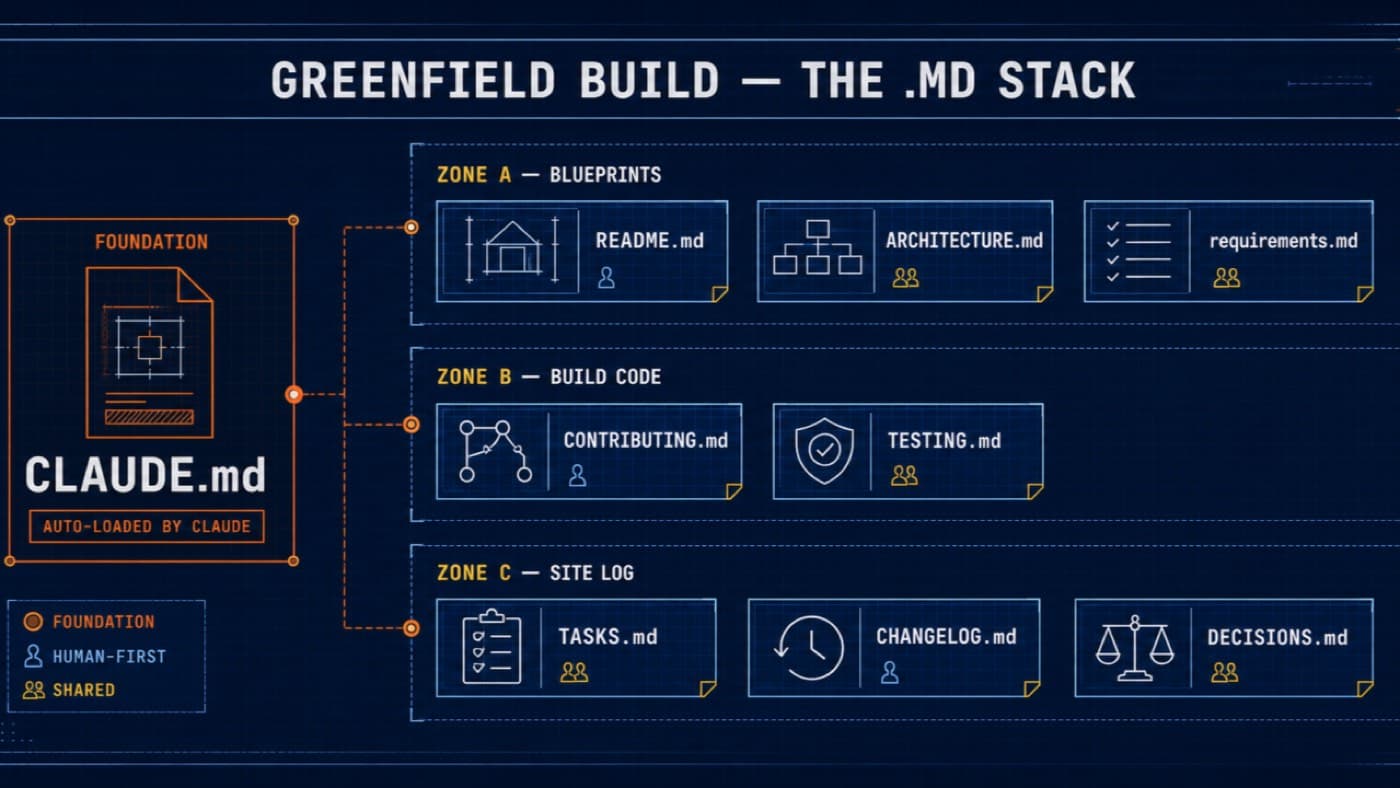
Over the last year, Claude Code has become the tool I reach for first the moment a project starts from zero — no legacy code, no existing patterns to fight, just an empty repository. I've watched it happen enough times now, across my own builds and the startups I mentor, to notice a pattern in what separates a smooth six-week build from one that needs a rewrite by month three.
The Challenge
The temptation with a greenfield project is to start typing. There's no technical debt to work around, no old architecture to reverse-engineer — just you, a blank editor, and an AI that will happily start generating code the moment you ask it to.
A year ago, when I started building a career counselling platform, without planning the plot (That time it was evolving) that caused lot of round trips causing huge rework.
The plot before the bulldozer
Here's how I've come to think about it. A greenfield project is an empty plot of land. Hand the fastest bulldozer in the world the keys and tell it to start digging, and it'll dig beautifully. It just won't know where the foundation goes, where the water line runs, or what was actually asked to be built.
The bulldozer was never the problem. The missing site plan was.
What worked: nine files, before one line of code
So before Claude writes anything, I write nine files. Not as bureaucracy — as the site plan the build stands on.
CLAUDE.MD: The foundation. The one file Claude Code loads automatically, every session. Conventions, commands, folder layout, hard "don'ts." Skip this, and you're re-explaining your project from scratch in every conversation.
README.MD: The front door. What this is, how to run it, where a newcomer should start.
ARCHITECTURE.MD: The load-bearing walls. Components, data flow, and why it's built this way and not another.
REQUIREMENTS.MD :The definition of done. Without it, Claude optimises for working code, not the right code.
CONTRIBUTING.MD:The house rules. Branch naming, commit style, how reviews happen.
TESTING.MD:The inspection standard. What must be covered before anything is called shippable.
TASKS.MD: The daily standup. What's active, what's next, what's blocked.
CHANGELOG.MD :The dated log. What shipped, when, and why.
DECISIONS.MD :Why we didn't build it the other way. One entry per hard call, so nobody re-litigates it in month four.
The surprise
The surprise for me wasn't that this works it's how little of it needs repeating. Write CLAUDE.MD once, properly, and every session after inherits that context for free. The files that felt like overhead in week one became the exact reason week six didn't need a rewrite.
Does this slow down day one? Yes — by an hour or two.
Does it save you the week-three fight where the AI-generated architecture doesn't match what three different developers each assumed it would be? Also yes.
The takeaway
AI isn't the enemy of speed here — it's an amplifier of whatever direction you point it in. Point it at a well-laid plot, and it builds fast in the right direction. Point it at a blank page with no plan, and it builds fast in every direction at once.A blueprint doesn't slow down construction. It's what makes construction possible in the first place.
If you're building greenfield with an AI co-pilot — which one of these nine files do you actually keep updated, and which one always goes stale first for you?
I write The Practical Technologist every week — practical takes on AI, business, and building things, from 26 years in IT.
First published on LinkedIn.